


How Parents Can Check Student Attendance Through the BINUS Mobile for Parent Application
Last Updated : 26 May 2026 13:30-
![BINUS @Greater Jakarta]() BINUS @Greater Jakarta
BINUS @Greater Jakarta
-
![BINUS @Bandung]() BINUS @Bandung
BINUS @Bandung
-
![BINUS @Malang]() BINUS @Malang
BINUS @Malang
-
![BINUS @Semarang]() BINUS @Semarang
BINUS @Semarang
-
![BINUS @Bekasi]() BINUS @Bekasi
BINUS @Bekasi
-
![BINUS @Senayan]() BINUS @Senayan
BINUS @Senayan






BINUS Mobile for Parent is an official application provided for parents to monitor students’ academic progress, including class attendance for each semester.
To help parents check attendance accurately, here are the steps that can be followed:
1. Install the BINUS Mobile for Parent Application
Parents can download the application through
2. Log in to the Application
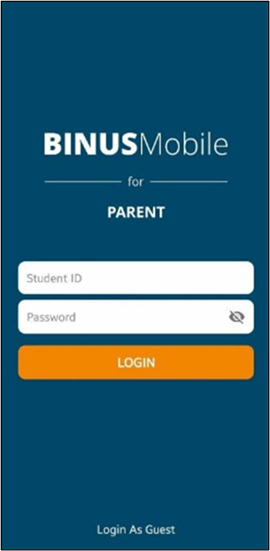
Enter:
- Student ID (NIM)
- Password
Default password: binusddmmyyyy
(ddmmyyyy = student’s date of birth)
3. Open the Main Menu
After successfully logging in, parents will be directed to the Home page.
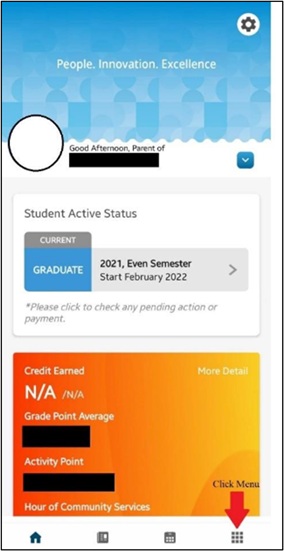
Click the Menu icon in the bottom right corner to view the available features.
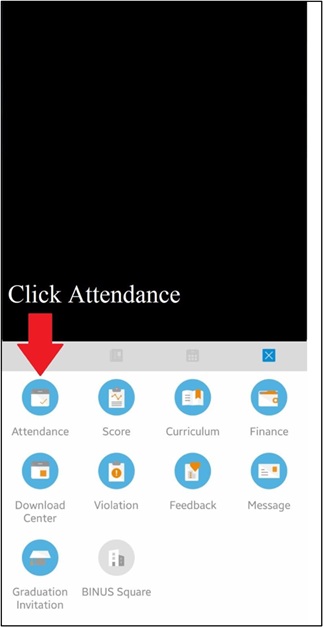
4. Select the “Attendance” Menu
From the menu list, select Attendance to access the student’s attendance data page.
5. View Student Attendance
On the attendance page:
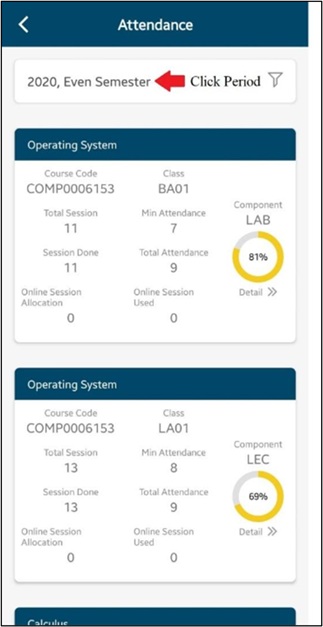
- Attendance data will be displayed automatically
- Parents can select the desired period or semester
- Attendance status will be shown for each course
By following the steps above, parents can easily and quickly monitor student attendance through the official BINUS Mobile for Parent application.